

Search K
Appearance
Use this guide to configure a Business Central service account in MinuteView. This service account is required for all Business Central workflow tasks, including BOM Operations, Item Operations, Attachments, and Get Lookups.
How it works
MinuteView connects to BC using application-only (client credentials) authentication via Azure Active Directory. No user login or consent flow is involved — the connection runs unattended using an Azure App Registration you create in your tenant.
Business Central authentication is OAuth (client credentials). The MinuteView server acquires an access token from Microsoft's identity platform and automatically refreshes it in the background, then calls the Business Central API directly. This means the server must have outbound internet access to the following domains.
The following domains must be accessible via HTTPS (port 443) from the server where MinuteView is installed:
| Domain | Purpose |
|---|---|
login.microsoftonline.com | Azure AD token acquisition and background token refresh |
api.businesscentral.dynamics.com | Business Central API calls (companies, items, BOMs, attachments, lookups) |
Server Access Required
These domains must be reachable from the server, not just from an administrator's PC. All Business Central authentication and API calls are made server-side by MinuteView. If the server cannot reach these domains, every BC workflow task will fail with a connection error.
Before starting, confirm you have:
Production)MinuteView – Business CentralFrom the app's Overview page, note down:
MinuteView) and choose an expiry (24 months recommended)WARNING
Set a reminder to rotate this secret before it expires. When it expires, all BC workflow tasks will fail until a new secret is entered in MinuteView Console.
API.ReadWrite.All and click Add permissions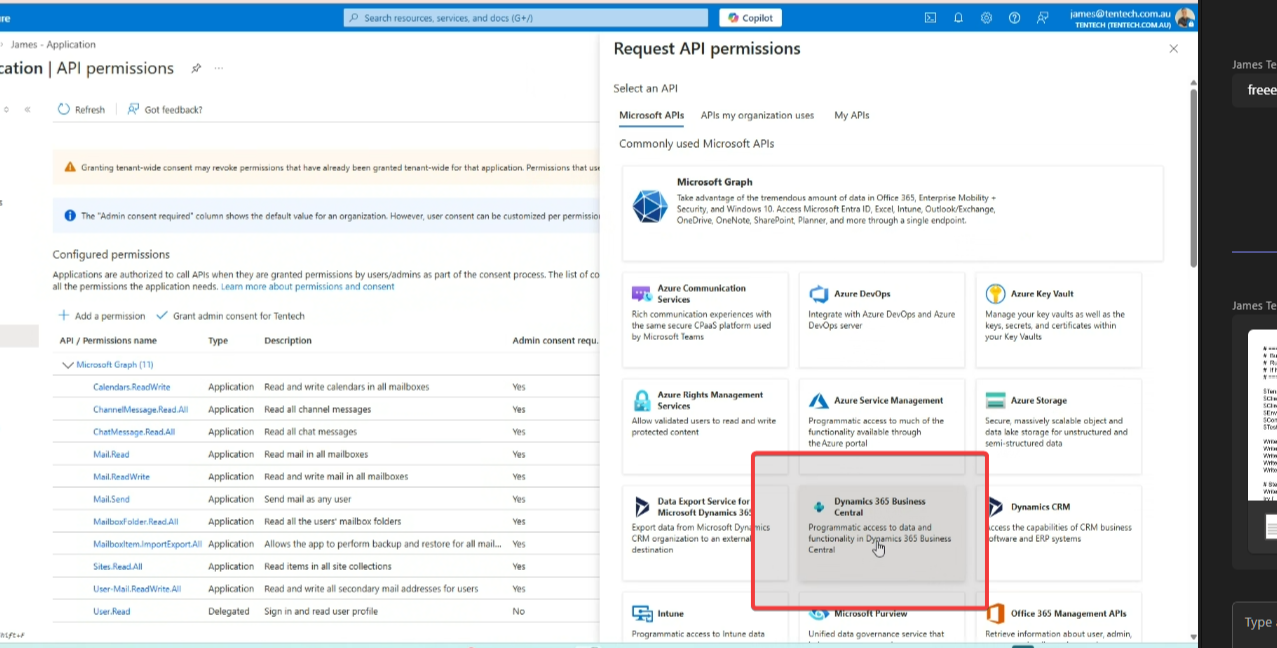
Why API.ReadWrite.All?
This scope covers the full BC API surface. MinuteView uses it to access companies, items, BOMs, and attachments. It is the standard permission for unattended server-to-server BC integrations.
Azure permissions alone are not enough — you must also register the app inside BC itself and assign it permission sets.
MinuteView IntegrationD365 BUS FULL ACCESS — for general item, customer, and vendor access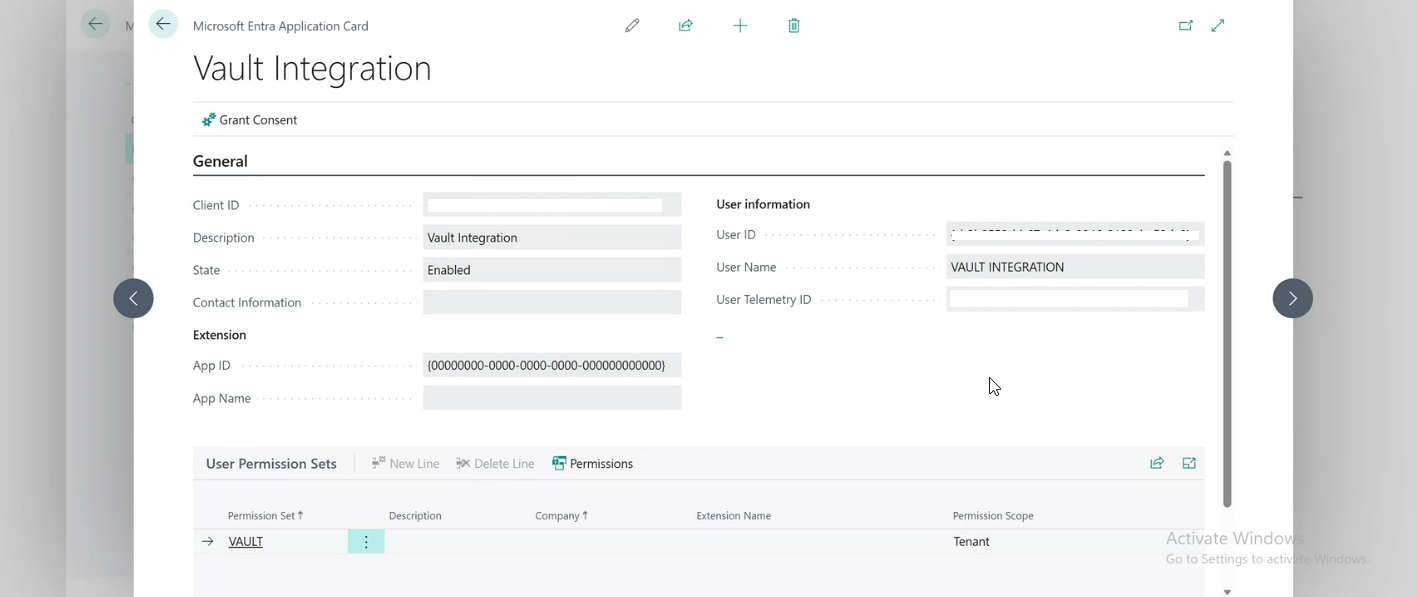
WARNING
If this step is skipped, MinuteView will authenticate successfully with Azure but receive 401 Unauthorised errors when calling BC — which can look like a credentials problem when it is actually a BC permission problem.
| Field | Value |
|---|---|
| Name | Something descriptive, e.g. Business Central – Production |
| Client ID | Application (client) ID from Step 1 |
| Client Secret | Secret value from Step 2 |
| Tenant ID | Directory (tenant) ID from Step 1 |
| Environment | Your BC environment name exactly as it appears in BC — e.g. Production |
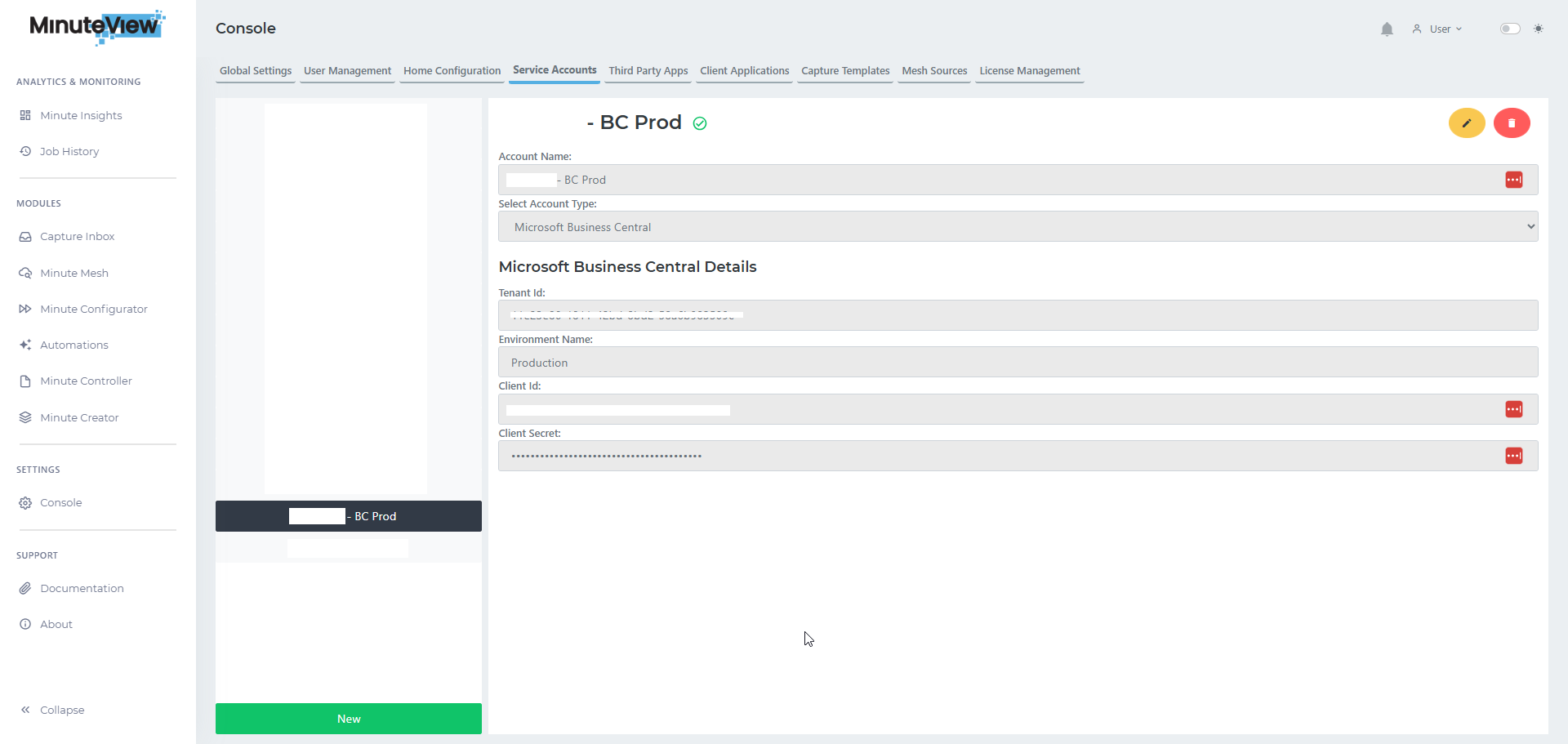
Environment name
The environment name is case-sensitive. You can find it in BC by going to Help → About or by checking the URL when logged into BC: https://businesscentral.dynamics.com/.../**Production**/...
Authentication failed / invalid client
401 Unauthorised when calling BC
Company not found
Environment not found
https://businesscentral.dynamics.com after login